Solar Inverter Troubleshooting: 10 Common Problems and Fixes
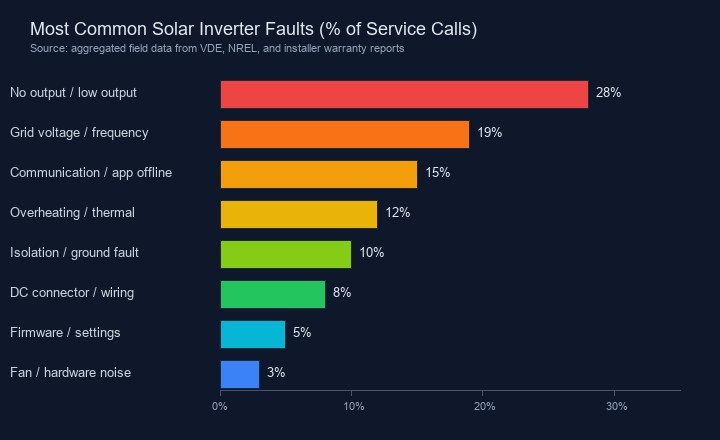
A solar inverter is the brain of your PV system. When it stops working, the panels may look fine, but your home isn't getting power. The good news: most inverter faults are not hardware failures. Aggregated field data from VDE, NREL, and installer warranty reports shows that roughly 28% of service calls come down to "no output or low output" — and many resolve without replacing the unit.
This guide covers the ten most common solar inverter problems, how to diagnose them safely, and which fixes you can handle yourself.
No Power Output or Sudden Shutdown
Start with the basics: DC isolator on, AC breaker not tripped, and sunlight available. These three checks solve more problems than most owners expect. Next, check the LED. Green means normal, red means fault, and no light usually means no DC power.
Use a multimeter at the DC input terminals. The voltage should be close to panel Voc multiplied by panels in series. If it reads zero or far below spec, the problem is upstream — panels, wiring, or connectors. Reset switches, reseat MC4 connectors, and inspect fuses. Call a pro if you smell burning, see scorch marks, or DC voltage is present but the inverter still won't start.
Grid Voltage and Frequency Errors
Grid-tied inverters must match local voltage and frequency. Europe uses 230V at 50Hz; North America uses 120V/240V at 60Hz. When the grid drifts outside tolerance, the inverter shuts down to protect itself and the network. This is correct behavior.
Repeated grid errors can mean the wrong country setting. A unit set to 60Hz will fault on a 50Hz grid. Voltage thresholds also vary: Germany's VDE-AR-N 4105, Italy's CEI 0-21, and the UK's G98/G99 all have different limits. Check the configuration first; if the fault persists, contact your utility.
| Error Pattern | Likely Cause | First Action |
|---|---|---|
| "Grid voltage high" at midday | Local overvoltage or export limiting | Check grid setting; contact utility |
| "Grid frequency" fault | Wrong country/frequency setting | Verify configuration matches grid |
| Random evening shutdowns | Voltage sag as neighborhood load rises | Monitor pattern; utility issue |
| Fault only on sunny days | Rapid voltage rise from generation | Enable reactive power control |
Communication Errors and App Offline
Your inverter can produce power while the app shows offline. WiFi systems drop when routers reboot or passwords change. PLC systems can be disrupted by appliances or old wiring. GEECO uses Sub-1G (868 MHz) for safety commands and WiFi for data, so critical functions keep working even if the app loses WiFi.
If the app is offline, power-cycle the inverter, verify your WiFi password, improve signal strength, and re-pair the device in the GEECO Smart app.
Anti-Backflow and Overheating
Anti-backflow prevents surplus solar from feeding the grid. Some systems throttle too aggressively because a CT clamp is reversed or the external limiter is too slow. GEECO's integrated anti-backflow measures power at the inverter with 0.01-second response and no external clamp. If output cycles rapidly, check that the export limit matches your local rule — typically 800W for German balcony solar.
Honest limitation: In net-metering markets, anti-backflow reduces income. Disable it if your utility pays for exports.
Overheating follows the same logic. A 95% efficient 800W inverter wastes about 40W as heat. Direct sun, blocked vents, or poor mounting can push it into thermal shutdown. Move it to shade, clear 10cm around vents, and clean dust every six months.
Ground, Isolation, Arc Faults, and Firmware
Ground, isolation, and arc faults are safety issues, not performance glitches. A ground fault means current is leaking; isolation fault means DC has lost separation from ground, often from moisture or damaged cabling; arc fault means dangerous arcing, usually at a loose connector. Do not reset these repeatedly. If they return after one reset, inspect cables, connectors, and junction boxes for water. Arc faults need immediate attention.
Firmware also matters. A 2024 Fraunhofer ISE study found that many "mystery faults" cleared after firmware updates, especially around grid ride-through. Update through the GEECO Smart app during low-generation hours, keep AC connected, and don't power-cycle mid-update. Failed updates usually roll back automatically.
GEECO Error Codes Explained
While codes vary by model, these are the most common GEECO indications:
- E01 / Grid Voltage: Grid outside range. Wait 5 minutes; if persistent, check country setting or call the utility.
- E02 / Grid Frequency: Configuration mismatch. Verify 50Hz vs 60Hz.
- E03 / Communication Lost: WiFi issue. Re-pair if signal is weak.
- E04 / Anti-Backflow Active: Normal in zero-export mode. Output limited by low consumption.
- E05 / Overheating: Improve ventilation or shade the unit.
- E06 / Isolation Fault: DC insulation problem. Inspect panels and cables for moisture.
Mini case: A Hamburg balcony solar owner saw his GEECO GE2000 drop offline every evening at 7 PM. The app showed E01 (grid voltage high). The utility confirmed a temporary overvoltage from a nearby transformer upgrade. Once the tap changer was adjusted, the fault cleared.
When to DIY, When to Call Support, and Maintenance
You can safely handle resets, connector checks, cleaning, WiFi re-pairing, and country-setting checks yourself. Anything involving sealed electronics, high-voltage DC work, repeated safety faults, or rooftop access belongs to a certified installer.
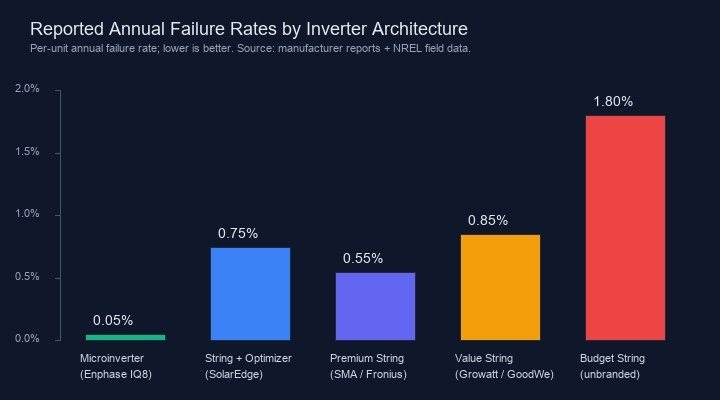
As the chart shows, inverter architecture affects reliability. Microinverters report annual failure rates around 0.05% per unit, while budget string inverters can exceed 1.5%. Build quality and local support matter more than headline price.
A simple maintenance schedule prevents most faults: check the app monthly, visually inspect hardware quarterly, clean vents every six months, check connector torque annually, and inspect after storms. When in doubt, document the error code and LED status before contacting support — you'll get faster help.